
In the past few months, I have been diving deeper into some of my React adventures that began a few years ago. With more time on my hands lately, I have been able to jump in and build hands-on personal projects to develop a deeper understanding of the React.js ecosystem.
As I refreshed my knowledge of React Hooks, I revisited useEffect and its surprisingly powerful capabilities. Around the same time, I learned that the recent Cloudflare Dashboard outage had something to do with the useEffect hook, so I decided to dig deeper and experiment with a few ideas. Below are the learnings that came out of my investigation.
A little React Primer
For readers who do not know React at all, I will briefly describe the general premise. React is a JavaScript library for building user interfaces, originally created by Facebook. It helps you describe what the UI should look like for a given state.
This is exactly why it is called React. Instead of manually manipulating the DOM with document.getElementById, innerHTML, or jQuery, you describe your UI as components using JSX and let React handle the DOM updates, essentially reacting to changes in state. JSX is a syntax extension that lets you write declarative, HTML-like code inside JavaScript.
Any DOM tree updates are first calculated using what React calls the Virtual DOM before they are diffed and applied to the actual DOM. These updates, or the reactivity, are driven by browser events, user interactions, or custom events. All of these features make React code highly composable, reusable, and performant.
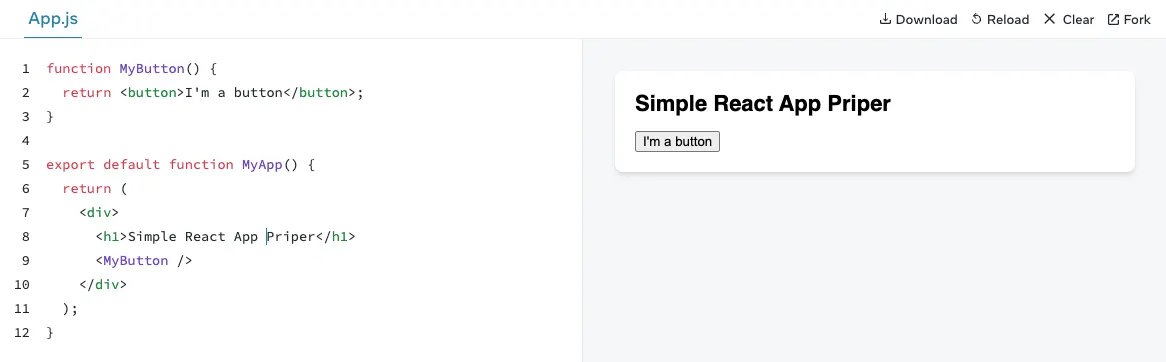
Above is a very simple JSX-based component example where, just by adding a few CSS rules and some state, via props in this case, we transformed a static component into a styled, reusable, and dynamic state-driven UI element. Of course, this is a simple example for demonstration, but hopefully you get the idea.
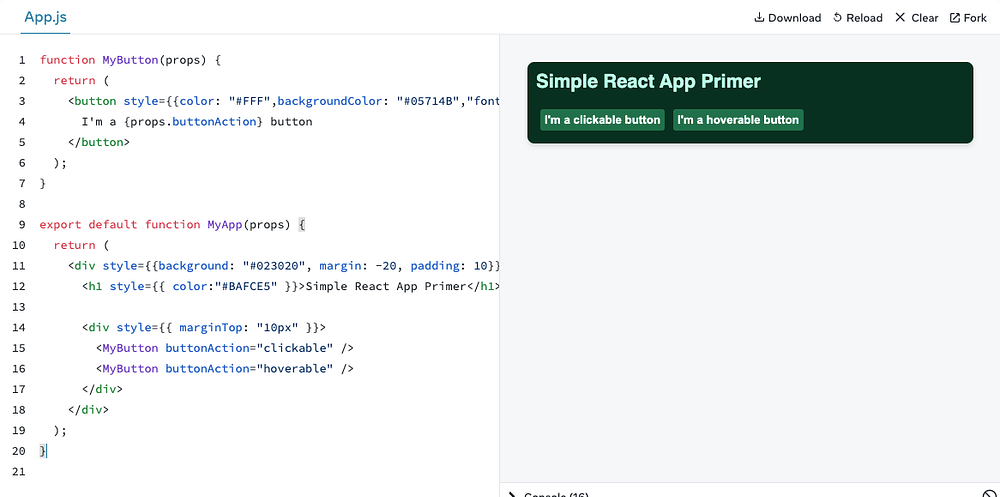 An extended version of previous app
Hooks and side-effects
Finally, we have React Hooks. Hooks in React are functionality that allow developers to use state and other React features inside function components without needing to write classes. These Hooks, which are just functions, give developers the ability to manage state, handle context, cache values and functions, defer re-renders, and perform other useful tasks.
React Hooks were introduced in v16.8.0. You can see the original release docs here: legacy.reactjs.org/docs/hooks-intro.html
The full list of hooks is available here: react.dev/reference/react/hooks.
One of these hooks is useEffect, which is essentially React’s way of allowing components to synchronise with external systems or APIs, and is commonly used to perform actions when the component loads or when certain state values change.
useEffect(() => {
  // Code to sync with an external system or API.
}, [dependencyArray]);
Before proceeding further, let’s talk about something called side-effects. I am not talking about the ones in medicine, but the idea is the same. An operation has a side effect if it has an observable effect other than its primary one.
In the React world, a side-effect is essentially anything that is outside the control of React’s render cycle. So when we talk about side-effects inside the useEffect hook, we are talking about API calls to external systems, network/fetch requests, or DOM events. These external systems live outside of React’s render cycle, and React has no way to influence them.
If the side-effect is not considered carefully, the useEffect hook may lead to infinite re-renders. This is exactly what caused the self-inflicted DDoS on the Cloudflare dashboard when one of their component’s useEffect hooks introduced a “problematic object in its dependency array”. Let’s dissect that sentence with a concrete example.
Infinite re-renders
Here is another React app that fetches a quote from a public external API. The simple UI renders an <h1>, a <button> tag, and a custom Quote component with a <p> tag holding the current count of quotes.
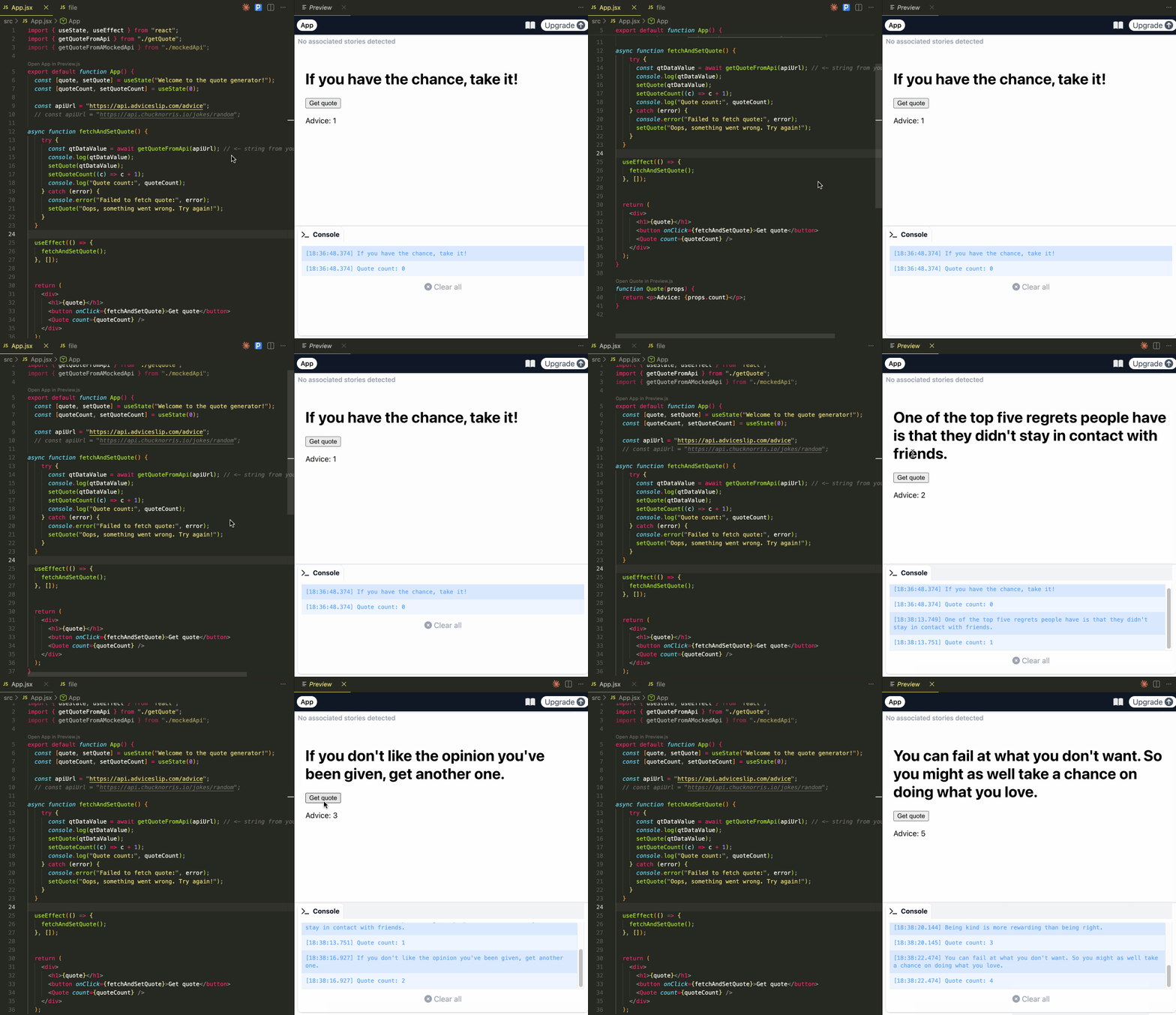 Quote App
Upon page load, I want the component to automatically fetch a quote, update the state to show the quote, and update quoteCount inside the <p> tag. Finally, when the user clicks on the Get quote button, the function getQuoteFromApi() is triggered to fetch a quote from an external API, update the quote value with a new one, and increment the value of quoteCount.
This is a very common pattern used alongside useEffect in many React applications to interact and sync with external systems on first page load.
useEffect(() => {
  fetchAndSetQuote();
}, []);
Observe an empty array [] is being used as a dependency within the useEffect hook. This tells React to re-render the component if the value of any of the array elements change. Not understanding this, skipping the dependency array, or using a mutable object may lead to an infinite re-render bug.
What can go wrong
Let’s visit the fetchAndSetQuote() function one more time and see the setQuoteCount((c) => c + 1); line, which updates the quoteCount state. It is being updated every time the button is clicked. However, we do not want to re-render the page every time it is updated, hence we do not include quoteCount in the dependency array because useEffect is run on page load.
Let’s see what happens when I add quoteCount to the dependency array or completely skip it.
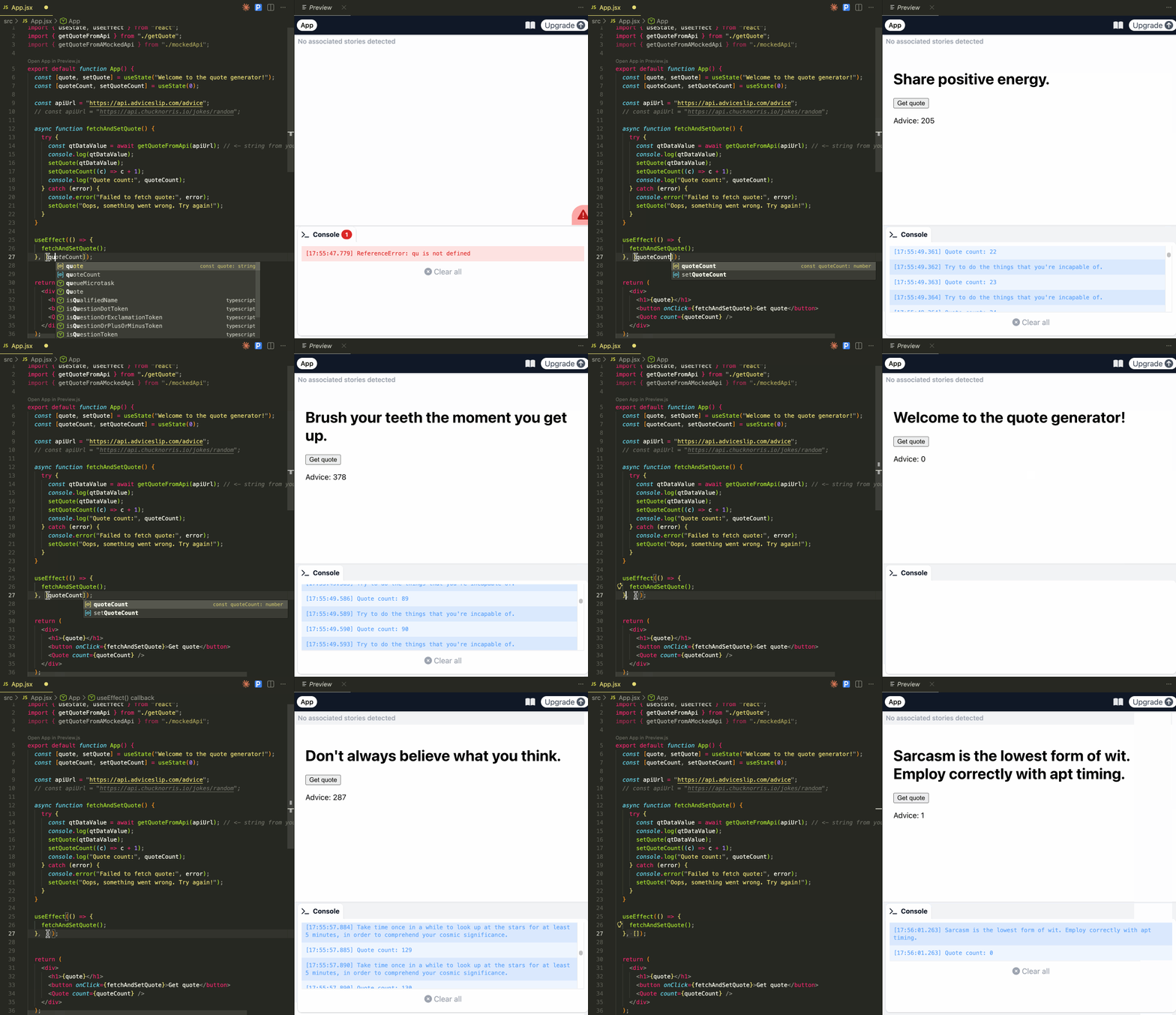 Problematic dependency array without rate-limited external API
As you can see, we end up with an infinite re-render loop until I stop the process or fix the array object. This is one of the caveats described in the React docs: react.dev/reference/react/useEffect#caveats.
If some of your dependencies are objects or functions defined inside the component, there is a risk that they will cause the Effect to re-run more often than needed. To fix this, remove unnecessary object and function dependencies. You can also extract state updates and non-reactive logic outside of your Effect.
What can be done
In addition to making sure a problematic object, which may cause the Effect to re-run more often than needed, is not introduced in the dependency array, I also mocked up a new service that serves quotes but introduced a rate-limit on how many quotes can be fetched from the service.
When I introduce a problematic object or skip the dependency array altogether within useEffect, I get an infinite re-render loop as before, but my front-end stops making additional re-renders due to rate-limiting.
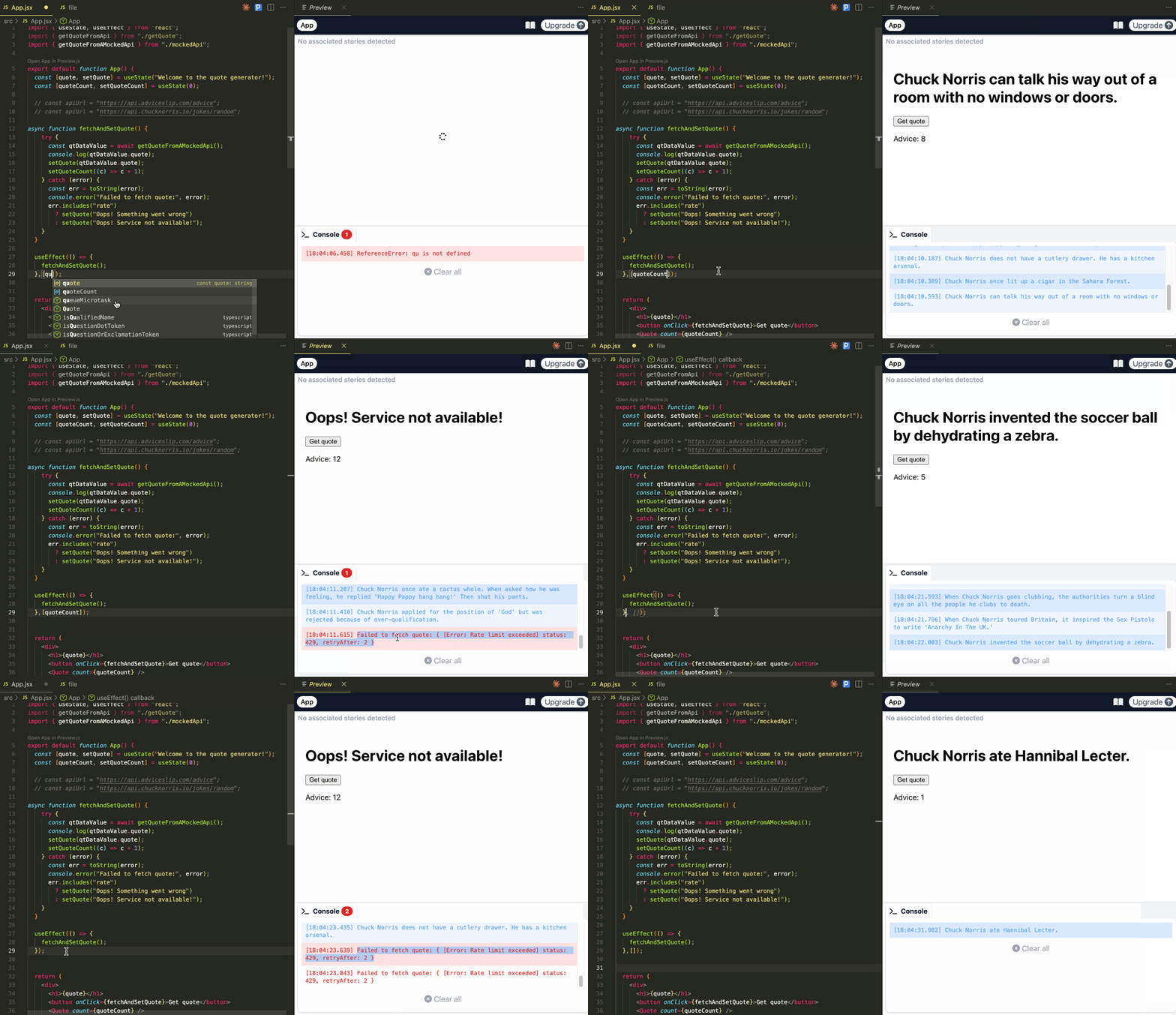 Wrong dependency array with rate-limited external API
Of course, this is an oversimplification of what may have happened at Cloudflare, and it is possible that the engineering team at Cloudflare were already aware of useEffect caveats and working towards fixing it before it became a big problem. Finally, a mix of these things led to a perfect storm, or as they mention, a thundering herd.
Having said all that, I can see that Cloudflare are looking for a frontend-focused platform engineer for their Dashboard and associated services. Not surprising at all.

Must I use useEffect
There are alternatives that have been suggested over the last few years, and two of the most popular ones are TanStack Query, through useQuery, and Redux, through RTK Query. They both provide solutions to make use of safer ways to fetch data from external APIs.
 TanStack & Redux
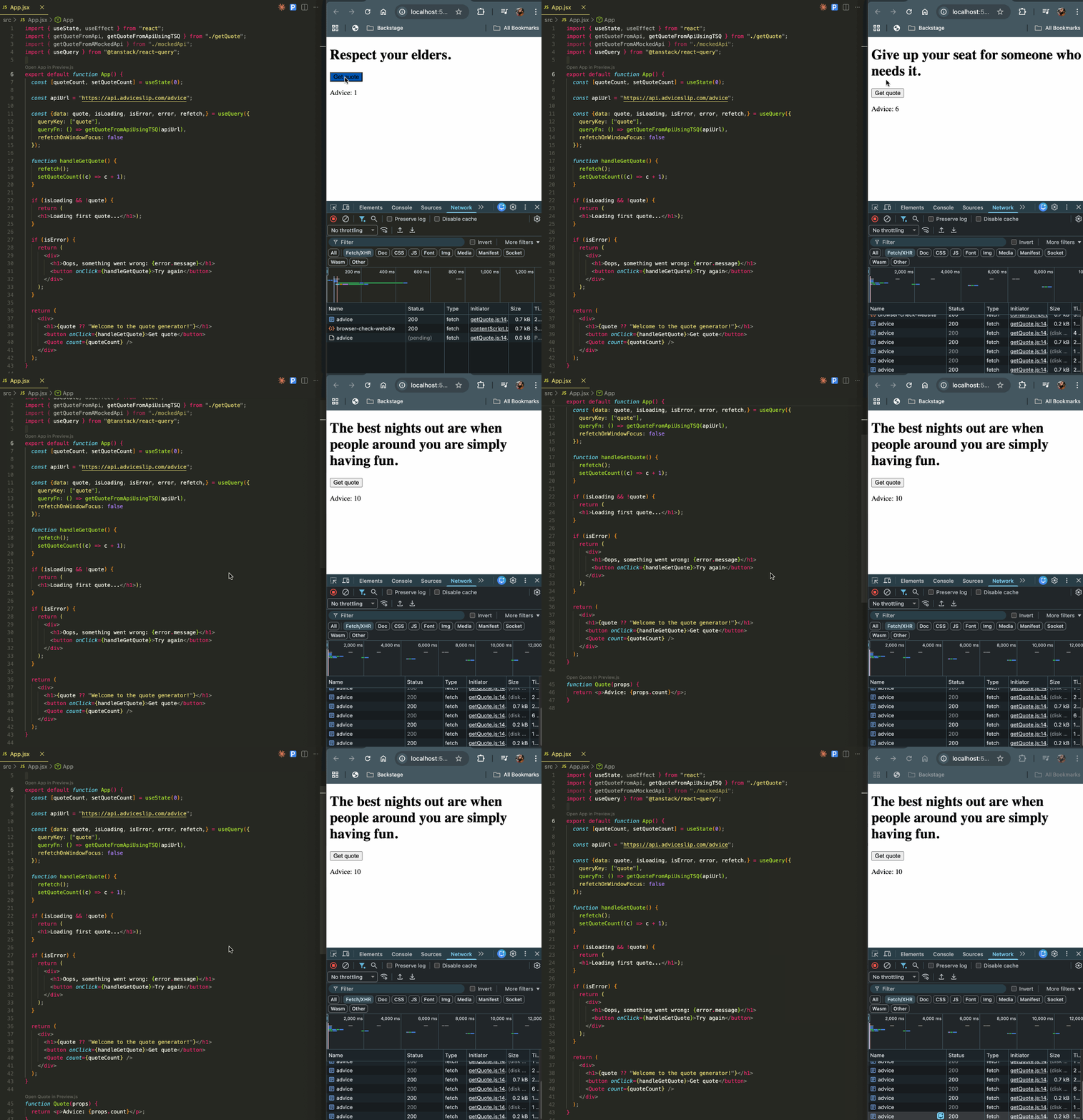 useQuery from TanStack
Remember, these are pretty comprehensive libraries/frameworks, allowing you to manage state lifecycle and a plethora of other features. Their use is tied to the requirements and the complexity matrix. It is a trade-off that only engineering and product teams can decide on collectively.
In closing
My exploration led me to a simple conclusion. I call it React’s KISS.

It is becoming increasingly necessary to understand modern frontends, their architecture and usage of external services, as well as building resilience through patterns that can help minimise these issues.
With the trend of increased AI usage, we must become more diligent about the resilience, security, and availability of our systems, especially if those systems are playing a crucial role in our day-to-day lives.
Originally published on Medium/FAUN.
Hero image by Tim Käbel on Unsplash.